
What happened
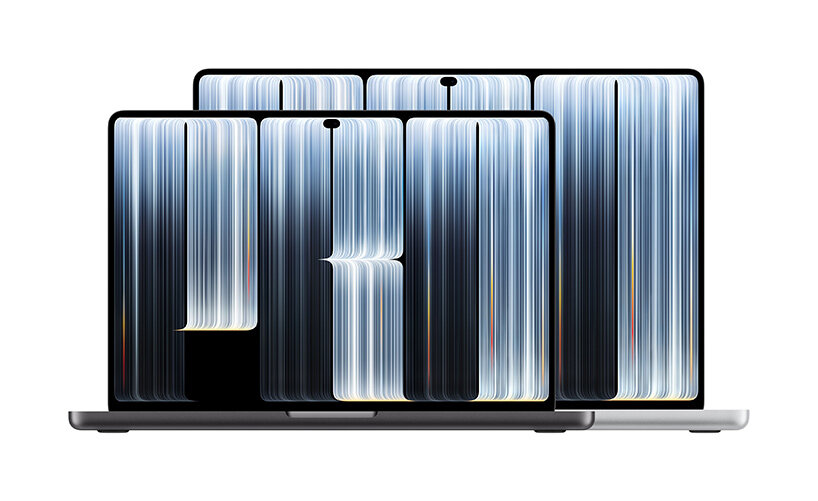
Apple announced the MacBook Pro with PROLED XDR Display on October 28, 2026. It is the first Mac with a touchscreen and a tandem OLED panel, it comes in 14-inch and 16-inch sizes, and it uses the same M5 Pro and M5 Max chips as the mini-LED models announced in March. Prices start at $2,899 for the 14-inch. Read Apple's announcement here: https://www.apple.com/newsroom/2026/10/apple-unveils-groundbreaking-macbook-pro-with-proled-xdr-display/
The chassis is thinner and lighter than the mini-LED version. The 14-inch drops from 3.5 pounds to 3.0 pounds and measures 0.59 inches thick. The 16-inch drops from 4.7 pounds to 4.0 pounds and measures 0.63 inches thick. Apple says it redesigned the thermal system for the new design and directed warm air away from the display, while keeping the same M5 Pro and M5 Max performance.
Reviewers tested that claim this week. Their results agree on performance and disagree on noise, and the disagreement tracks the physical size of the machine.
The 16-inch result: performance holds, everyday use stays quiet
Fstoppers tested a 16-inch M5 Max with a 40-core GPU and 128 GB of memory. Run Cinebench 2026 twice back to back and the multi-core scores come in at 9,543 cold and 9,557 on the warm second run, so the second run on a heat-soaked machine scored the same as the first. Under a full all-core load, package power held between 69.6 and 71.2 watts, the Performance clusters held about 98 percent of their peak clock, and thermal pressure read Nominal throughout. Even a punishing run of 40 consecutive all-core compression rounds never dropped below 88.3 percent of the first round score, and it recovered to 93.4 percent by the final round. The reviewer also noted the fan stopped right after an 11-minute all-core run ended and the chassis was already cool to the touch.
9to5Mac tested a 16-inch M5 Pro and found the same pattern at the lighter end. Geekbench results matched the models from earlier this year, and in everyday work of writing, research, photo editing and dozens of Safari tabs, the reviewer reported no noticeable heat or fan noise and never heard the fans kick in once.
Tom's Hardware looped the test on its 16-inch M5 Max, running Cinebench 2026 ten times in a row. In Automatic mode the score started at 9,080 and settled around 8,050, a drop of about 11 percent. In High Power mode it started at 9,647 and never fell below 9,479, a drop under 2 percent, with more fan noise. So on the 16-inch the power mode decides whether a long job holds its speed or settles, and High Power earns its noise.
MediaStorm measured the outside of the machine. After a 30-minute stress test, the 16-inch PROLED model peaked at a surface temperature of 47.8 C, against 56.4 C on the older non-touch M5 Max model, with the hottest areas at the center of the keyboard and the exhaust vents. That fits Apple's claim about directing warm air away from the display. Keep it in perspective: a cooler case is not proof of a cooler chip. The chip-level evidence is the Fstoppers thermal pressure reading above.
The 14-inch result: same speed, more fan to get it
Notebookcheck tested a 14-inch M5 Pro and reached a different noise conclusion. The lighter chassis does affect fan noise, and the OLED model is louder than the mini-LED model before it:
| Mode | PROLED 14-inch | Mini-LED 14-inch |
|---|---|---|
| Auto, under stress | About 5,600 rpm, 44.6 dB(A) | About 5,100 rpm, 41 dB(A) |
| High Power, under stress | About 8,700 rpm, 55.5 dB(A) | About 7,500 rpm, 51 dB(A) |
Notebookcheck lists louder fans under load and higher chassis temperatures under load as cons. Under maximum load the top of the chassis reached 49.4 C and the bottom reached 47.8 C, with the keyboard area at about 45 C. Two limits keep this in perspective. First, the first fan level at 2,400 rpm is barely audible, and the machine stays very quiet in everyday use. Second, performance did not fall off a cliff: Notebookcheck notes some throttling and calls cooling performance similar overall, not better and not worse. Gizmodo reached a matching impression on its review unit, flagging that the fans can get extra loud at peak while the palm rests stayed comfortable.
In short, the 14-inch did not get slower. It got louder to stay fast.
What this means for your Mac's thermals
Thinner and lighter is a thermal trade, not free headroom. The chips and their heat output did not change, so the redesigned system has to move the same heat through a smaller chassis. On the 16-inch, the larger body absorbs that trade and the fans rarely need to work hard outside sustained renders. On the 14-inch, the fans do more of the work, and you hear it as higher rpm and higher dB(A) under the same kind of load.
Watch thermal pressure, not just temperature. The strongest signal in the Fstoppers testing is not a single temperature number. It is macOS reporting Nominal thermal pressure while the machine held near peak clocks on a warm second run. Nominal means macOS did not need to cut performance to control heat. A Mac that shows rising thermal pressure and falling clocks on the same job, run after run, is throttling. A Mac that holds its clocks at Nominal is not, even if the fans are loud.
Treat High Power mode as a different decision on each size. On the 16-inch it buys real sustained speed: Tom's Hardware held within 2 percent across ten Cinebench runs in High Power, against an 11 percent settle in Automatic. On the 14-inch, High Power pushed fan noise from 44.6 dB(A) in Auto to 55.5 dB(A) in Notebookcheck testing, for little to no benchmark gain in its results. Pick High Power for long jobs on the 16-inch when minutes matter. Stay on Auto for everything else and keep the room quieter. Notebookcheck also found the familiar 96 watt power draw cap still applies, so a full load at high brightness in High Power can drain the battery about 15 percent per hour even while plugged in.
Expect the pattern, not a fault. Loud fans under a sustained export, render or compile on the 14-inch PROLED model match what three independent reviews measured in the first week. Loud fans at idle, on a desk, with nothing heavy running do not match. Check Activity Monitor first in that case.
Practical takeaways
- Choose the 16-inch if you run sustained renders, exports or compiles and fan noise bothers you. It holds performance with far less audible effort in these first tests.
- Choose the 14-inch for the weight if your heavy jobs are short. Bursts finish before heat builds, and everyday use stays quiet on both sizes.
- Leave the power mode on Auto unless a long job justifies High Power. Check the fan noise cost before you switch.
- Check thermal pressure during a long job to tell throttling from normal fan work. Hold performance at Nominal and the cooling system is doing its job.
- Ramp the fans earlier on the 14-inch if you run long loads back to back. An earlier curve trades a little noise early for lower peak temperatures later.
- Keep the Mac on a hard, flat surface with the vents clear during long jobs. A thinner chassis has less margin for blocked airflow.
Sources
- Apple Newsroom, October 28, 2026: Apple unveils MacBook Pro with PROLED XDR Display. https://www.apple.com/newsroom/2026/10/apple-unveils-groundbreaking-macbook-pro-with-proled-xdr-display/
- MacRumors, October 28, 2026: Apple Announces OLED MacBook Pro With Touch Display. https://www.macrumors.com/2026/10/28/apple-new-macbook-pro/
- 9to5Mac, November 5, 2026: MacBook Pro with PROLED XDR Display review. https://9to5mac.com/2026/11/05/macbook-pro-with-proled-xdr-display-touch-review/
- Fstoppers, November 5, 2026: MacBook Pro PROLED XDR Review. https://fstoppers.com/gear/review-macbook-pro-proled-xdr-display-and-m5-max-screen-changes-everything-905426
- Notebookcheck, November 5, 2026: Apple MacBook Pro 14 PROLED XDR Review. https://www.notebookcheck.net/Amazing-OLED-panel-Apple-MacBook-Pro-14-PROLED-XDR-Review.1438048.0.html
- Gizmodo, November 5, 2026: MacBook Pro with PROLED XDR Display Review. https://gizmodo.com/macbook-pro-with-proled-xdr-display-review-2000835221
- ZEERA Wireless, November 6, 2026: MacBook Pro PROLED XDR benchmarks, specs and test results (summary of the Tom's Hardware 10-run Cinebench test and the MediaStorm surface temperature measurements). https://zeerawireless.com/blogs/news/macbook-pro-proled-xdr-performance-tests-specs-benchmarks
Header photo: Apple, MacBook Pro with PROLED XDR Display press kit (Apple Newsroom, October 28, 2026).
Sources
- Apple unveils MacBook Pro with PROLED XDR Display (Apple Newsroom)
- Use Low Power Mode, Auto Mode, or High Power Mode on your Mac (Apple Support)
More from the guides
 Mac thermal fundamentalsMac thermal throttling: how to identify it without guessingLearn what thermal throttling means on a Mac, which evidence matters, and how to run a repeatable test before changing cooling behavior.
 Mac thermal fundamentalsHow to check Mac temperature and keep the reading honestCheck Mac temperature with the right sensor context, validate that readings refresh, and pair them with Activity Monitor and macOS thermal state.
 Mac thermal fundamentalsThinner OLED MacBook Pro expected October 27: what it means for your thermalsApple is expected to unveil a thinner, lighter touchscreen OLED MacBook Pro on October 27. Here is what the redesign could mean for heat and fan noise.
Related docs: Check compatibility, Review current monitoring limits
Smart Breeze records local temperature trends on-device, so a long job on your Mac shows up as numbers, not impressions. Download Smart Breeze